
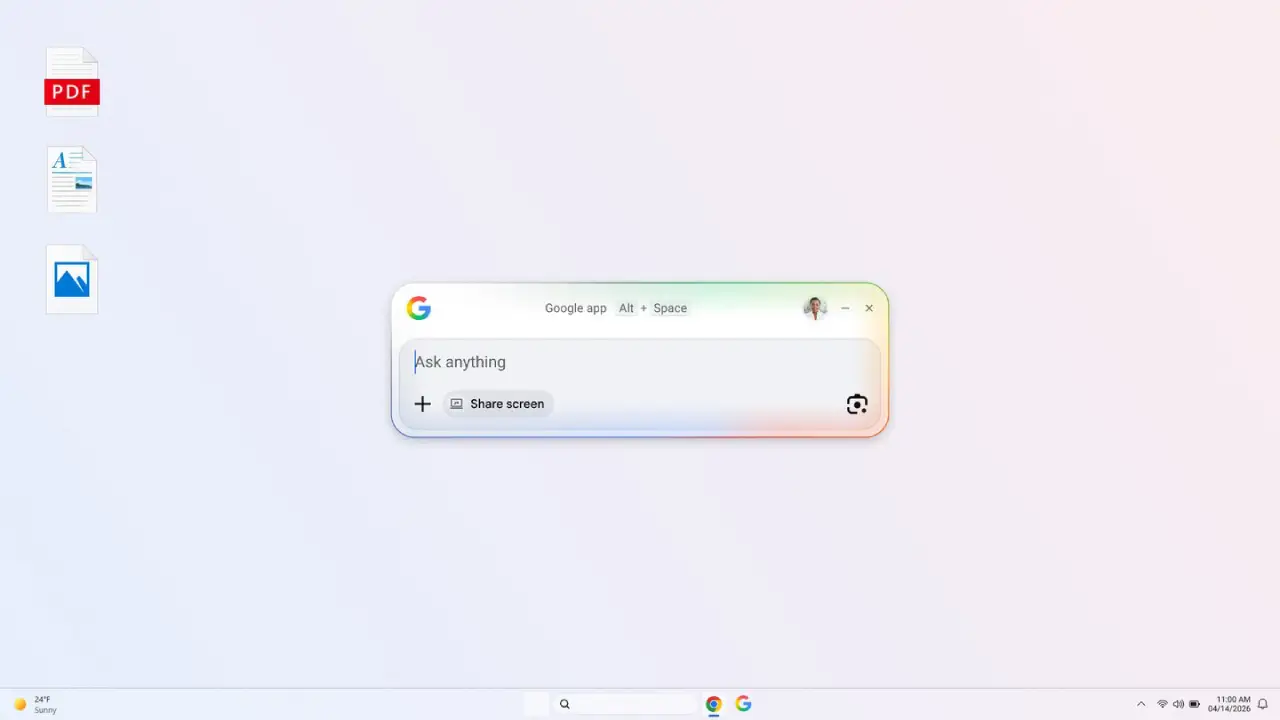
Google just launched a simple desktop app for Windows. It mixes Search, AI tools, and file access into one easy launcher. The app helps users quickly find info across the web, local files, installed apps, and Google Drive without switching browser tabs or apps.
It is rolling out globally in English for Windows 10 and newer systems after earlier testing through Google Labs.
What the Google Desktop App for Windows Is
The Google desktop app for Windows is a simple search tool that helps you find things faster on your computer. Instead of opening a browser, users can bring up a quick search interface that works across:
- Web search results
- Local computer files
- Installed apps
- Google Drive files
So, it puts everything into one easy search bar so you can find what you need without switching between different apps.
Alt + Space Shortcut to Launch Instantly
Just press Alt + Space, and a search bar will pop up on top of any active window. This makes it easy to quickly find things without stopping your work or switching windows.
How AI Mode Changes the Way You Search
The app includes Google’s AI-powered search experience, allowing users to interact with search in a conversational format.
Instead of just links, AI responses can:
- Give straight answers to questions
- Summarize key information
- Answer follow-up questions in the same window
AI features are being added over time, so access may vary depending on where you are.
Google Lens for On-Screen Search
The desktop app includes Google Lens integration, allowing users to search what appears on their screen.
Users can select screen content and:
- Translate text
- Identify objects in images
- Copy or extract text
- Run visual-based searches
These features are being rolled out in stages, so availability may vary.
Screen Sharing for Better Context and Support
The app may include a screen-sharing or context-sharing feature that allows users to share either a single window or their full screen.
When turned on, users ask questions about their view, like:
- Document content explanation
- Simple math or task help
- On-screen information details
Important detail: This feature only works when you start it. The app doesn’t constantly watch your screen.
Real-World Use Cases of the Google Desktop App
Here are practical ways this tool can fit into daily work.
1. Learning and studying
Students can ask questions like:
- Give a simple explanation of this topic.
- Give a short breakdown of this part.
Helps deliver organized answers with references.
2. Work and productivity
Working with spreadsheets or docs, users can:
- Get support for formulas/errors.
- Display windows with context answers.
- Ask without changing applications.
Helps work continue smoothly.
3. Visual search with Google Lens
If users spot images, products, or text on screen, they can:
- Use Lens to recognize what it is.
- Translate text instantly.
- Extract text for reuse.
- Find related information online.
This makes visual content easier to search.
How It Differs from Using Google in a Browser
While Chrome remains Google’s main browser, this app focuses on faster desktop access.
It provides:
- Instant access via keyboard shortcut.
- Results float on the screen instead of tabs.
- Combined access to Files, Apps, Drive, and Web Search.
- AI features and Lens in one interface (depending on rollout).
The goal is faster access, not replacing the browser.
Google Desktop App Availability on Windows
The Google desktop app for Windows:
- Works on Windows 10 and newer systems.
- It is rolling out globally in English.
- Already tested in Google Labs.
- It can be downloaded from Google’s official site.
Features are rolling out gradually, and availability may vary depending on region and user account. There is currently no confirmed macOS version.
Why This Launch Matters
This release shows a shift toward bringing search closer to the operating system level. Instead of just using a browser, search now works right inside your desktop.
The combination of:
- system-wide launcher-style search.
- AI-powered responses.
- lens for visual search, and
- a fast keyboard shortcut.
Makes finding info and tools super quick.
Final Takeaway
Google’s Windows desktop app speeds up searching and working. Chrome stays in your browser. One desktop screen holds search, AI support, and all your files together-no more jumping between apps or tabs.
People find information, open files, and get answers instantly. Perfect for students, workers, and busy multitaskers. Overall, it saves you time every day while keeping work neat and simple.
Install Google desktop app now.