


Adobe has rolled out its Firefly AI Assistant in public beta, and it changes how creative work is done. Instead of digging through menus and tools, you can simply tell it what you want. The software listens and gets to work.
It shifts creative work from step-by-step actions to clear, simple instructions. You focus on the idea, not the process. Here’s what that means and why it matters.
What Is Adobe Firefly AI Assistant?
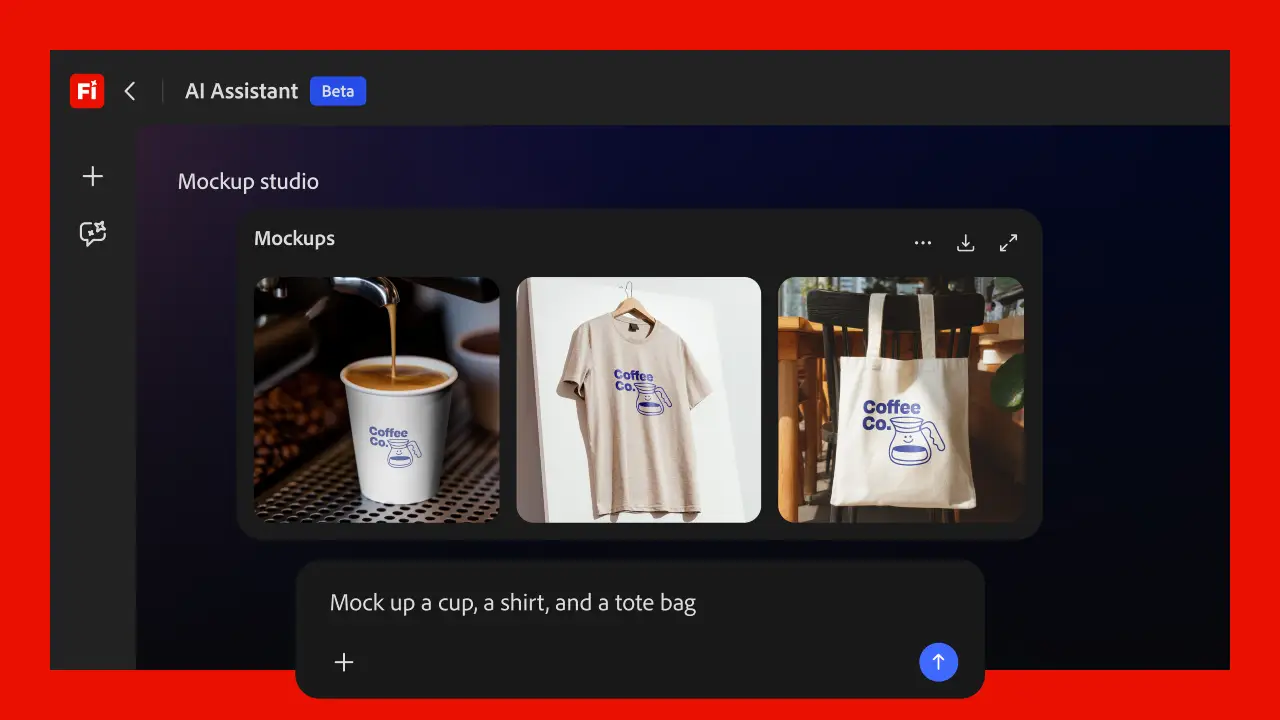
Firefly AI Assistant is a conversational AI built into Adobe Firefly. It works through a chat-based interface designed to turn your instructions into completed creative tasks.
Instead of jumping between tools, the assistant connects capabilities from apps like Photoshop, Illustrator, Premiere Pro, and Lightroom within a single interface.
You have an idea and go straight to the result in one easy flow. The assistant works across Creative Cloud apps, handles the steps in between, and takes care of the technical parts so you can focus on your idea.
How It Works in Practice
The workflow follows a simple pattern.
- You describe your goal.
- The assistant understands what you ask for.
- It picks the right tools for the job.
- It executes multi-step actions.
- You refine or adjust as needed.
This way cuts down the extra steps. You don’t have to click through lots of menus.
Key Features You Should Know
Conversational Creative Workflow
You type what you want. The assistant translates it into actions. This replaces step-by-step editing with a simpler way. You can edit images or videos just by typing what you want, instead of using manual controls.
Cross-App Integration
The assistant pulls tools from across Adobe Creative Cloud. It works with:
- Photoshop
- Premiere Pro
- Illustrator
- Lightroom
- Firefly tools
This lets you work across different apps without switching between them yourself.
Multi-Step Task Automation
The assistant breaks your request into steps. It executes them in sequence. For example:
- Retouch images.
- Resize for social platforms.
- Apply lighting adjustments.
- Generate variations.
All of this happens in one guided workflow.
Creative Skills (Prebuilt Workflows)
Adobe includes easy workflows called Creative Skills that guide you step by step. Examples include:
- Portrait retouching.
- Prepare product pictures.
- Create social media graphics.
- Make quick mockups just by typing what you want.
They make things quicker, so you can start without delay.
Multi-Format Support
Firefly AI Assistant supports Images, Videos, and Visual designs. You can move across formats inside one environment. You do not need to switch tools.
Human Control Stays Intact
You remain in control throughout the process.
- You can edit outputs.
- You can refine prompts.
- You can override decisions.
The assistant supports your creative direction. It does not replace it.
How Creators Use Firefly AI Assistant Today
This is how it works in real scenarios.
Content Creator
You upload a product image. You request social media assets. The assistant generates multiple formats and variations in one workflow.
Designer
You describe a brand style. The assistant builds layouts. It applies styles and prepares assets.
Marketing Team
You ask for campaign visuals, and the assistant creates them while keeping everything consistent across platforms and following a clear design style. Adobe confirms that users can generate full sets of assets using simple prompts.
Availability and Current Limitations
It is available to Creative Cloud Pro, Firefly Pro, Pro Plus, and Premium plans.
Current limitations include:
- Primarily available within the Firefly web interface.
- It does not work in all desktop apps yet.
- English is the primary supported language.
- They keep growing with new features.
Little things matter, and they are still improving it step by step.
What Makes It Different
Most AI tools focus on single tasks like image generation or text editing. Adobe is taking a wider approach.
- It connects multiple tools.
- It handles complex tasks for you.
- It keeps track of what you are doing across steps.
This positions Firefly AI Assistant as a workflow orchestration system rather than a single-task tool.
Why This Matters
Creative work has always required two things: Clear ideas and Strong tool knowledge. Adobe is reducing the need for deep tool expertise. You focus on intent. The assistant handles execution.
This changes how beginners start, how pros work faster, and how teams scale content. The focus shifts toward direction and decision-making.
Getting Better Results with Firefly AI Assistant
To use this tool effectively, you need to shift your approach. Start by thinking about the result you want to create. Be clear about the outcome from the beginning. Once you define that, the assistant takes care of the steps behind the scenes.
Your role is to guide the direction. The system handles the execution.
Final Thoughts
Adobe is building toward a model where creative work feels more like directing than editing. Firefly AI Assistant reflects that shift. It is still in beta. Features will continue to expand. But the foundation is clear.
If you use Adobe tools, this is worth testing now. Start with simple workflows. Observe where it saves time. Adobe has introduced the system, but the real value comes from how you use it.