

Adobe dropped some big news on June 17, 2026. The company brought its AI assistant to Photoshop, Premiere, Illustrator, InDesign, and Frame.io, all now in public beta. Adobe Firefly also got an upgrade with new AI skills and a cleaner studio setup.
This is not a small update. Adobe is changing how its whole creative suite works. The idea is simple: the AI handles the repetitive stuff, you stay in charge of the creative decisions.
So what exactly got updated, how does it help people who actually use these tools every day, and does it live up to the promise? Let’s get into it.
What Adobe Actually Announced
Adobe split this announcement into two parts: Firefly and Creative Cloud apps.
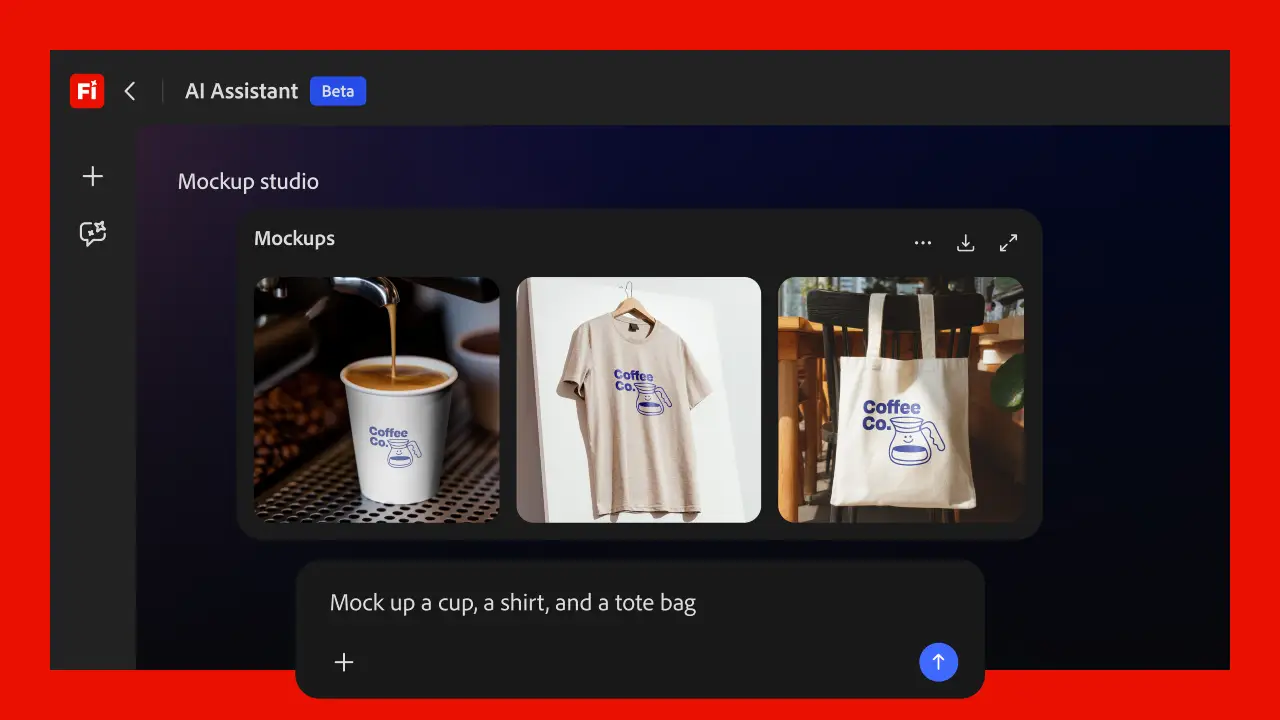
For Firefly, Adobe added new creative skills to its AI Assistant. You get brand kit generation, short-form product video creation, quick cut video assembly, and storyboard generation.
The idea is straightforward. A solo creator describes what they want, and the assistant handles the rest. All the pro tools from across Creative Cloud now live in one simple chat interface. You type the outcome you want, and the assistant figures out the steps to get there.
On the Creative Cloud side, Adobe is bringing AI Assistant to five apps as public betas:
- Premiere handles prep work like sorting assets into bins, batch renaming clips, identifying interview questions, and building a rough first cut from your footage.
- Photoshop takes a description of the desired outcome, such as swapping a background or resizing assets across platforms, and executes it across the entire composite.
- Illustrator supports multi-step production jobs, including generating 50 versioned files from a spreadsheet, reorganizing layers, or running a pre-flight check before anything goes to print.
- InDesign applies brand or copy updates across every layout when you drop in a new brand PDF or open an existing template.
- Frame.io helps organize shoot assets, surface feedback across revisions, and generate B-roll inside the project.
After Effects support is in private beta. More apps are expected to follow.
Why This Update Matters to Creative Professionals
So who actually benefits from this? Let’s find out.
- For video editors, the Premiere integration addresses something genuinely painful. The pre-edit grind, which includes ingesting footage, organizing bins, renaming files, and marking selects, can eat hours before any real creative work begins. If Adobe’s AI Assistant handles that reliably, editors get back meaningful time on every project.
- For graphic designers, Illustrator has the most useful update here. Generating 50 versioned files from a spreadsheet is the kind of task that either requires scripting knowledge or a painful afternoon of manual exports. An AI Assistant doing that via plain language input is a real time saver for agency and in-house teams.
- For brand managers and marketing teams, InDesign’s ability to apply brand updates across layouts removes a bottleneck that slows down every campaign update cycle.
Here’s what ties all of this together. Adobe’s thinking is simple: the assistant does the work, you make the calls.
Their 2026 Creators’ Toolkit Report surveyed over 16,000 creators worldwide. 75% said creative AI is now part of how they work every day. But 85% also said the final creative decision should always be theirs. Adobe is building directly around that balance.
The Firefly Studio Upgrade Adds Context Across Projects
Beyond the Creative Cloud apps, Adobe previewed an upgraded Firefly creative AI studio experience that is currently in private beta with a waitlist.
Two features stand out:
- Elements lets you save characters, locations, or objects you’ve already created and reuse them across generations. This matters for anyone running campaigns or stories that require visual consistency across multiple assets.
- Projects keep assets, generations, and creative context organized across Firefly and Creative Cloud so you can pick up where you left off without rebuilding context from scratch.
Most AI tools forget everything when you close the tab. Projects and Elements fix that. Your work stays saved, so you can pick up right where you left off.
Adobe Is Also Expanding Onto Third-Party Platforms
Adobe’s tools are now available on ChatGPT, Microsoft 365 Copilot, and Anthropic’s Claude. Adobe also announced plans to expand to Google Gemini and Slack. This means Adobe’s creative capabilities reach platforms where hundreds of millions of people already work every day, well beyond the Creative Cloud user base.
This is a distribution play as much as a product one. If you’re already drafting in Claude or working in Copilot, you will not need to switch tools to pull Adobe’s capabilities into your workflow.
What This Is Like in Practice
Here’s the thing. The actual quality of these AI assistants, how accurate the pre-flight checks are, how well the auto-edits hold up, and how reliably the versioned file generation works, will determine whether this sticks for professionals.
Public betas invite real-world testing at scale, which is how Adobe will learn what works under pressure. Early reports from the Firefly AI Assistant beta have been positive, and Adobe says the tool has seen strong adoption since its public beta launch. The Creative Cloud integrations are newer and will take more time to evaluate in production environments.
What is clear is that Adobe is not building a single generalist AI tool. Each AI Assistant is a specialist. The Premiere assistant understands editorial workflows. The Illustrator assistant understands print production. That specificity is what separates this from a generic chatbot attached to software.
Availability and Pricing
The latest Firefly AI Assistant capabilities are available today in the Firefly web app. The upgraded Firefly studio with Elements and Projects is in private beta. You can join the waitlist.
AI Assistant is now live and free to try in Premiere, Photoshop, Illustrator, Frame.io, and InDesign. After Effects is coming soon in private beta. Beta access is included with your existing Creative Cloud subscription.
Wrap Up
Adobe is making a clear bet: you direct, AI executes. The rollout across Photoshop, Premiere, Illustrator, InDesign, and Frame.io proves this is no longer just a concept. It is live. The real test is how these tools hold up in actual production over the next few months. If they do, they solve problems creatives have dealt with for years.
Adobe has four decades of trust built with professionals. That gives these integrations a head start that newer AI tools do not have.
If you are a Creative Cloud subscriber, jump in and try it. The public betas are live right now. Pick the app you use most, spend a few minutes with the AI Assistant, and see what it actually does for your workflow.