Google does not always make noise when it launches something important. This time, it quietly released Google AI Edge Eloquent, an offline-first AI dictation app for iOS. At first glance, it looks like another speech-to-text tool. Spend a little time with it, and the difference becomes clear.
This is not about simply converting raw voice into text. It is about turning speech into cleaner, more usable text from the start. Let’s break it down.
What Is Google AI Edge Eloquent?
Google AI Edge Eloquent is a dictation app that turns speech into text in real time. It runs directly on your device after downloading its AI models, so it works even without internet access.
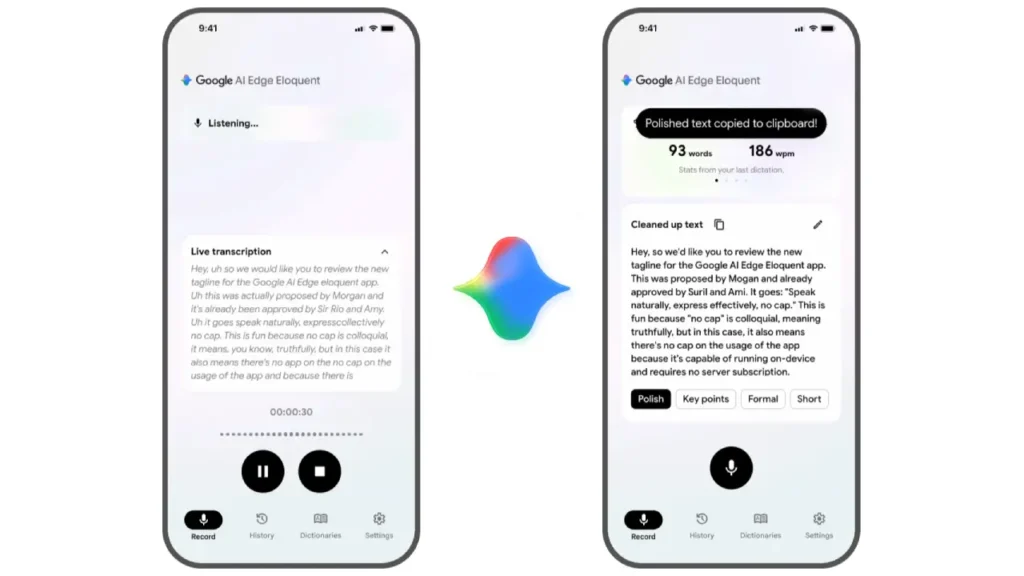
Here’s what stands out. It turns speech into cleaner, more readable text. You speak. It gives you text that is closer to a usable draft with less editing required.
Key capabilities include:
- Real-time speech-to-text transcription
- Automatic removal of filler words like “um” and “ah”
- Offline functionality using on-device AI
- Text formats such as key points, formal, short, and long
- History tracking with usage insights
This is not traditional dictation. It is a refined output built on top of transcription.
How Does Offline AI Work?
Most dictation tools still rely on cloud processing. Your voice gets uploaded, processed, and sent back to you. That adds delay and raises privacy concerns.
Google AI Edge Eloquent takes a different approach. It uses on-device speech recognition powered by Google’s Gemma AI models. Once downloaded, everything runs locally on your phone.
This leads to clear benefits:
- It runs smoothly without delays from the servers
- Stronger privacy since audio stays on the device
- Reliable use without the internet
There is also an optional cloud mode. When enabled, Google uses Gemini models to refine the text output further. What this really means is simple. You can stay fully offline or switch on cloud refinement when needed.
Features That Make a Difference
Real-Time Transcription
The app transcribes as you speak, not after you finish. It updates continuously and shows live output.
Automatic Speech Cleanup
This is where the app feels different.
- Removes filler words such as “um”, “uh”, “like”, “you know”, “actually”, etc.
- Cleans up mid-sentence corrections.
- Produces more readable text.
Smart Text Transformations
Refine your words after they’re captured.
- Summarize into key points: Turn your speech into clear, concise highlights.
- Adapt to a formal tone: Instantly make your writing more professional.
- Gets better with you: Learns your style to deliver more accurate results over time.
- Expand your ideas: Convert short inputs into more detailed content.
Personalized Vocabulary
The app adapts to your language over time.
- It brings in names and important terms from Gmail
- Allows custom words
- Improves accuracy for specific use cases
Usage Insights
It tracks your dictation patterns:
- Words per minute
- Total words spoken
- Session history
This adds a productivity layer that many apps ignore.
Why Did Google Launch It Quietly on iOS?
Google usually launches new tools on Android first. This time, it started with iOS and did not promote it heavily. The app appeared on the App Store without a formal announcement.
This shows Google may be testing how people use it while entering a competitive dictation market.
The app competes with tools like Wispr Flow, SuperWhisper, and Willow. An Android version is referenced but not yet available.
Where This Fits
Think about how you use voice input today.
- Taking notes while moving
- Drafting messages quickly
- Capturing ideas without typing
- Creating content on the go
- Most tools still require editing after dictation
Google AI Edge Eloquent reduces that effort. It gives you text that is closer to a usable draft instead of a raw transcription. This matters for:
- Writers and content creators.
- Students and researchers can use it easily.
- Professionals handling quick documentation.
What Sets It Apart?
There are already dictation apps in the market. So where does this one stand?
- Works offline with on-device AI.
- Free with no subscription or usage cap.
- Built-in text cleanup and formatting.
- Custom vocabulary support.
Most tools use the cloud, which causes processing delays, but Google uses local processing with optional cloud assistance.
Why Does This Matter?
AI is moving closer to the device. Instead of cloud-based processing, more apps now run AI on the phone itself, leading to quicker results and stronger privacy.
Google AI Edge Eloquent reflects that shift. It shows that:
- AI that runs directly on your device is finally a reality.
- Voice input is starting to feel natural and smooth.
- Productivity tools are evolving toward automation.
This is not limited to dictation. It points to how people will interact with devices going forward.
Final Thoughts
This is useful today, not early hype. Google AI Edge Eloquent already delivers real value. It converts speech into cleaner text, removes filler words, and works offline using on-device AI.
At the same time, it is still early. Accuracy is not perfect yet. Language support is limited. Integrations are still developing.
What this means is simple. The foundation is strong, and the product already works in real use. It is not a future promise. It is a practical tool that will improve with time.