

For years, every new WhatsApp conversation started the same way. You had to hand over your phone number before sending a single message. Fine with friends and family, a little awkward with a new client, a community group, or someone you’d just met.
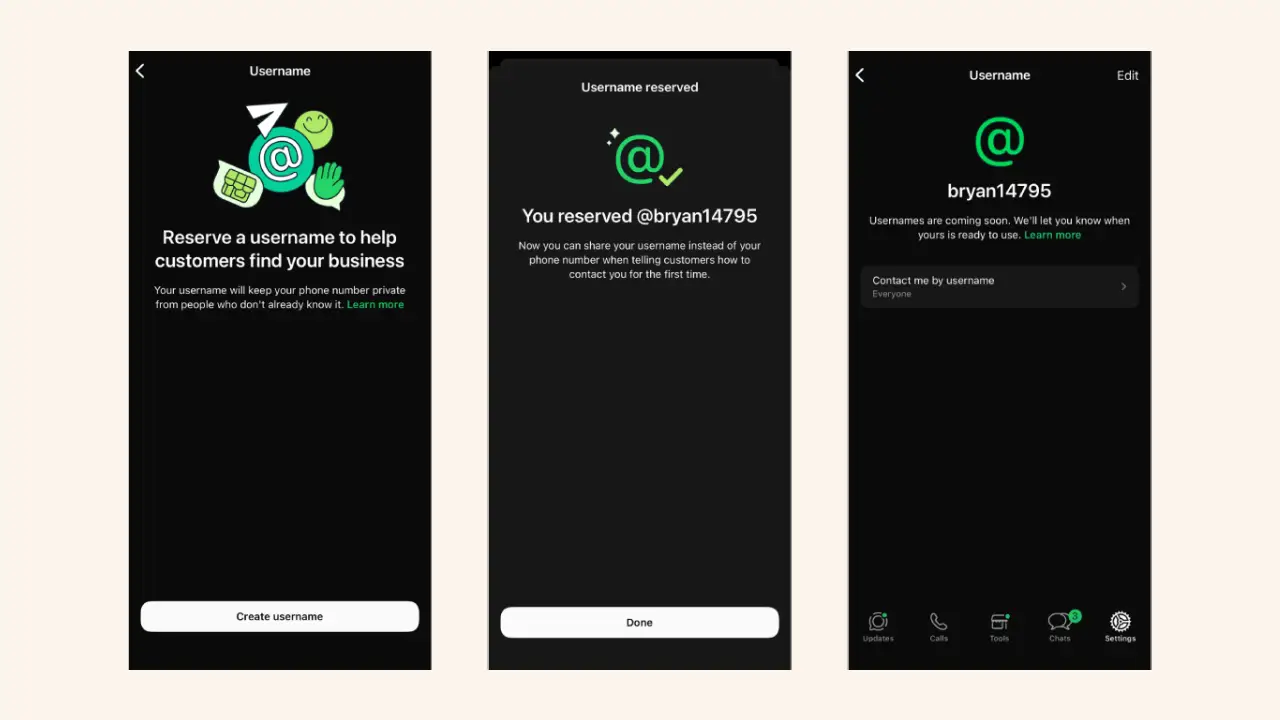
WhatsApp is finally changing that. The app has started rolling out username reservations, letting eligible users secure a unique username ahead of the full launch later this year. Once it’s live, you’ll be able to start chats without sharing your number, and end-to-end encryption stays exactly as it’s always been.
If you’ve been waiting for a more private way to connect, here’s what to know.
What Is a WhatsApp Username?
Think of a WhatsApp username the same way you’d think of a handle on Instagram or X. Instead of giving someone your phone number, you’ll be able to hand them a username and let that start the conversation.
Your phone number isn’t going anywhere, though. It still powers your account in the background. The username simply gives new contacts another way to reach you, one that doesn’t expose your personal number.
Here’s the thing. WhatsApp has over three billion users, so popular usernames are going to disappear fast once the floodgates open. That’s exactly why the company decided to open reservations early, before the feature reaches everyone at once.
Username Rules You Should Know
Before you start brainstorming your username, there are a few rules worth keeping in mind.
- Your username needs to be somewhere between 3 and 35 characters. It has to be unique, no two people can have the same one.
- Username cannot end with a period.
- WhatsApp has already set aside certain usernames for celebrities, public figures, brands, and organizations. This should also help limit the number of accounts that try to impersonate them once usernames go live.
If the username you wanted is already gone, WhatsApp’s built-in generator will suggest some alternatives.
Why WhatsApp Is Introducing Usernames
Privacy has always been one of WhatsApp’s strongest selling points, yet starting a new conversation almost always means giving up your phone number. Usernames quietly fix that gap in a lot of everyday situations.
- A freelancer can talk to a brand new client without sharing a personal number.
- Parents can join their kid’s school or sports group chat with a little more breathing room.
- Small business owners can keep customer conversations separate from their personal line.
- Anyone joining a community group can connect without oversharing right out of the gate.
Businesses and creators get something extra here too. Eligible accounts may be able to reserve a username that matches their existing Facebook or Instagram handle, which makes it easier for people to recognize official accounts at a glance.
How the Username System Works
WhatsApp took a noticeably different approach compared to most social platforms here.
There’s no public directory where people can scroll through usernames. There are no automatic suggestions pointing strangers toward your profile. Someone has to already know your exact username before they can reach out to you for the first time.
WhatsApp also built in something called a Username Key, and it’s optional. Turn it on, and anyone messaging you for the first time through your username will need to type in both the username and the key before the conversation even starts. It’s basically an extra lock on the door, especially handy if you’ve shared your username somewhere public.
A few things worth remembering along the way:
- Your phone number is still required to set up and use WhatsApp at all.
- A username doesn’t replace your number, it just adds another option.
- If someone messages you through your username, they won’t automatically see your phone number unless they already had it saved.
- You’re free to change or remove your username down the line if you ever want to.
How to Reserve Your Username
If reservations are open on your account, claiming a username only takes a couple of minutes.
Update WhatsApp to the latest version.
- Open Settings.
- Tap Account.
- Select Username.
- Pick an available username and confirm your reservation.
Don’t see the option yet? No need to worry. WhatsApp is rolling this out gradually, and you’ll get a notification right in the app once it becomes available for your account.
When Will Usernames Actually Be Available?
This is where a lot of people get tripped up, so let’s break it down. Reserving a username and actually using one to message people are two completely different stages of this rollout.
Reservations have already started for eligible users. Actually being able to start conversations with usernames will roll out gradually over the next several months.
If reserving your preferred username is already an option for you, go ahead and grab it now. Short, catchy usernames tend to vanish quickly once more people get access.
Why This Update Matters
Most privacy conversations these days revolve around data breaches or tracking. WhatsApp’s update tackles something a lot simpler, but it’s something nearly everyone runs into.
People hesitate to hand over their phone number to someone they’ve only just met, and honestly, that hesitation is fair. Usernames remove that barrier without making the conversation feel any less easy.
Apps like Telegram, Signal, and Wire introduced usernames years ago. WhatsApp is finally bringing that same idea to one of the largest messaging platforms in the world, giving billions of users a new way to control what they share and when.
Final Thoughts
WhatsApp usernames might just be one of the most practical privacy updates the app has shipped in years. Instead of relying solely on phone numbers, people will soon have another way to connect while keeping their personal details exactly that, personal.
The rollout is happening in phases, so not everyone will see it right away. But if reservations are already live on your account, now’s a smart time to lock in the username you actually want, before millions more people get the same opportunity.