

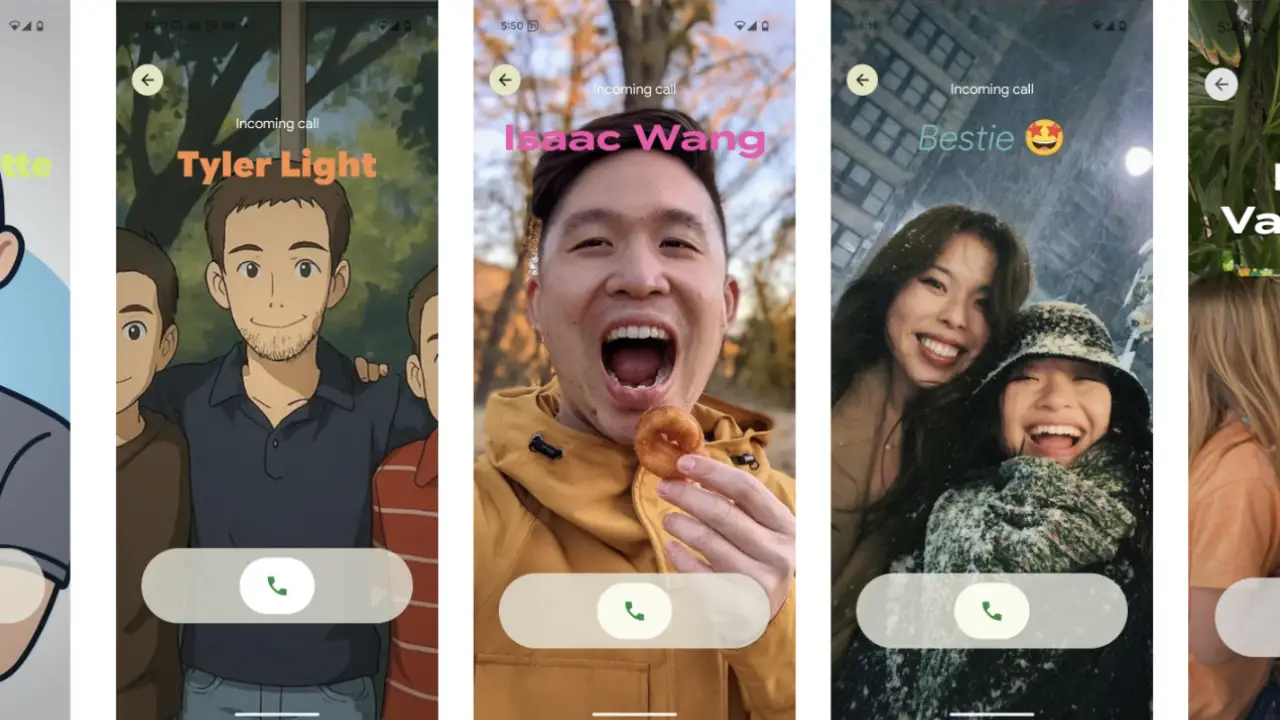
If you’ve been scrolling through your latest Android updates and skipped right past the dialer app, it might be time to give Google Phone another look. The app just rolled out something called My Calling Card, and it’s basically a style upgrade for your outgoing calls. It lets you design a personalized profile that shows up when you call someone, so your caller ID can actually reflect who you are.
What Does My Calling Card Do?
Here’s the thing: when you make a call, what shows up is often just a number or a generic profile. But with the new feature inside Google Phone, you can:
- Pick a contact photo, include an emoji or monogram.
- Choose fonts and colors so your outgoing call screen reflects your look.
- Preview how your card appears when the other person sees it.
What this really means is your call identity becomes more than a number and truly reflects you.
Why Does It Matter?
Let’s break it down. You customize your wallpaper, widgets, and maybe the look of your lock screen. Why not your calls? With this feature, your outgoing calls look intentional:
- Your friends might recognize your style before you’ve even said “Hi”.
- Business calls feel more visible, more branded, with you in charge of your image.
- You gain more privacy and control over how you’re seen during calls.
It fits with Android’s Material You design and lets you control how your phone looks.
What Does This Mean for Android Users?
Google isn’t just making a small visual change to Google Phone. This is part of a bigger push:
- The update is tied to Android 16, where calling cards and customisation are more deeply integrated.
- It hints at cross-device consistency: your visual identity during calls could sync across other apps like Google Contacts or messaging platforms.
For those who want to stand out (or just be recognised quickly), this is a real change.
How to Get the Most Out of This Feature?
Here are a few practical tips if you’re planning to use this feature:
- Make sure you’re on the latest version of Google Phone (or join the beta if the feature hasn’t reached you yet).
- Choose a photo or icon that’s clear and recognizable.
- Experiment with font styles and colors that match your personality or brand.
- Remember, the other person may need a compatible version too, since the rollout is happening in stages.
Final Thoughts
Here’s the thing: call screens rarely change. But with Google Phone, your outgoing calls can finally feel more personal, more like you.
It might not sound like a big deal, but being able to choose how you appear when someone’s phone rings adds a personal touch. But it’s actually a pretty smart way to make everyday communication feel more human.
Are you curious to try it out? Just open your Google Phone app and look for “My Calling Card” (or “Calling Cards“), and you can start customizing from there.
If it hasn’t appeared on your device yet, don’t worry, the feature is rolling out gradually. Soon your calls will look and feel exactly how you want them to.