



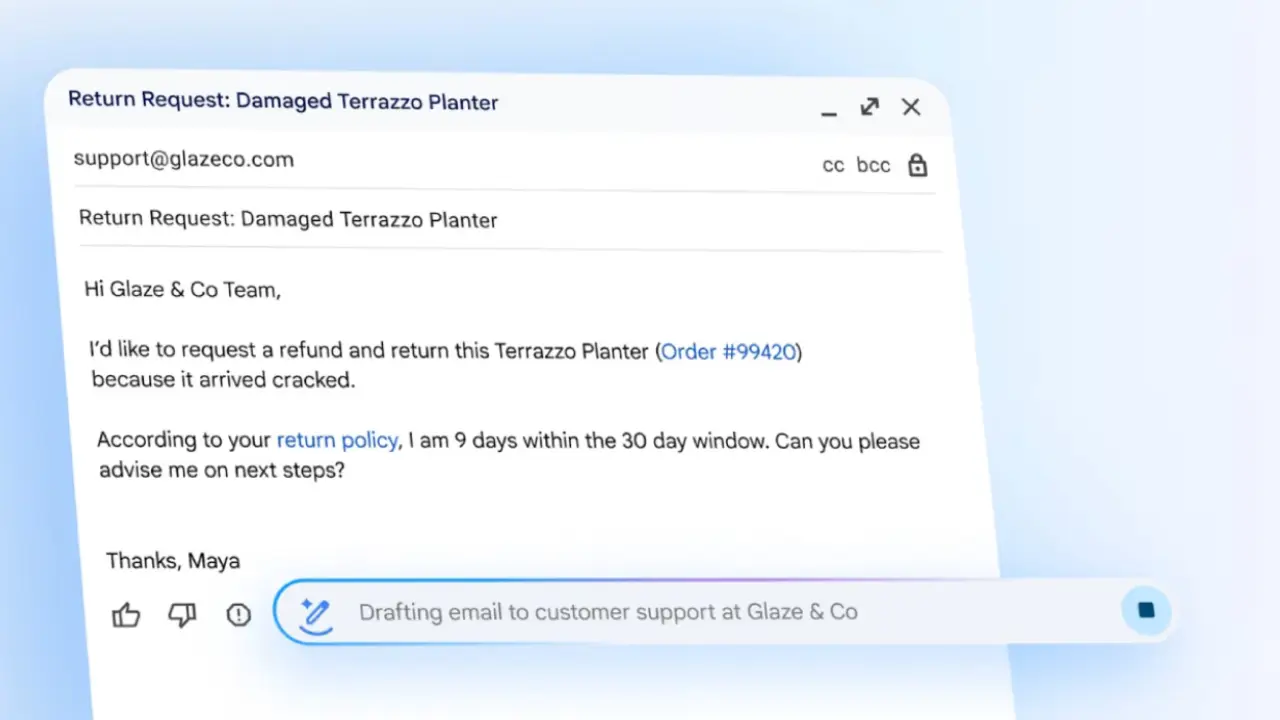
Google is quietly changing Gmail, and the latest Gmail AI features show just how much email is evolving. Instead of keeping AI tools hidden in the old Gemini side panel, Gmail now brings these features right into your inbox, where they can help you as you work.
This isn’t about a fresh look. It’s about making email easier every day. Reading messages, replying, and keeping your inbox organized is faster and simpler with Gmail AI features helping quietly in the background.
What’s New in Gmail AI Features
Before, Gmail AI features were hidden in the Gemini side panel, which you opened by clicking the spark icon near your profile picture. From there, you could summarize emails, get suggested replies, draft messages, search old emails, open Drive files, and check Calendar events.
Now, Gmail AI features appear right inside your emails and compose window, making them easier to use while you work:
- AI Overviews: Summarize long threads, highlight key points, and even show previews in Gmail search results.
- Suggested Replies: Send quick replies that understand everything in the email thread.
- Help Me Write: Draft and improve emails directly in the compose window.
- Proofread: Review your email to fix spelling, grammar, and tone so it’s easy to understand.
- Quick Access: Gmail helps you search emails and attach Drive files in seconds.
These in-line AI tools replace the old “Ask Gemini” setup, putting Gmail AI features exactly where you need them to make email faster and easier.
Why AI Is Now Built Into the Inbox
The old Gemini side panel needed clicks, and users wanted instant AI help. By putting Gmail AI features directly into emails, Google made them feel like a natural part of Gmail.
The side panel is still there on some Android devices and Workspace accounts, but on the web, it’s mostly gone for U.S. AI Pro and Ultra users.
How Gmail AI Improves Everyday Email
Busy inboxes often contain long threads and unclear requests. Gmail AI features help users:
- Get the important details right away.
- Respond faster without sounding generic.
- Write clearer, more professional emails.
- Find messages, attachments, and files quickly with AI search.
These Gmail AI features do the hard work for you, making it easier to handle emails and keep your inbox organized.
Availability Across Devices and Plans
Not everyone has the same Gmail AI features yet, and rollout depends on device and plan. Then you can continue with the rest as you have:
- Web: The Gemini side panel is being removed slowly for U.S. AI Pro and Ultra accounts.
- Android: The Gemini side panel is still available for some users.
- Workspace Plans: Panel and full AI features remain available.
- Free Tier (U.S.): Help Me Write, Suggested Replies, and AI Overviews are now available to all.
- Premium (Pro/Ultra): Adds proofreading and advanced AI search.
Over time, Google will bring these Gmail AI features to users everywhere.
Final Thoughts
Ask Gemini has turned into smarter in-line tools that live right in your inbox. With these Gmail AI features, you can quickly summarize long threads, draft emails, check spelling, suggest replies, and find messages fast.
They make long emails easier to read, help you reply quickly, and keep your inbox neat. Try Gmail AI features and watch your email become faster and simpler to manage.