



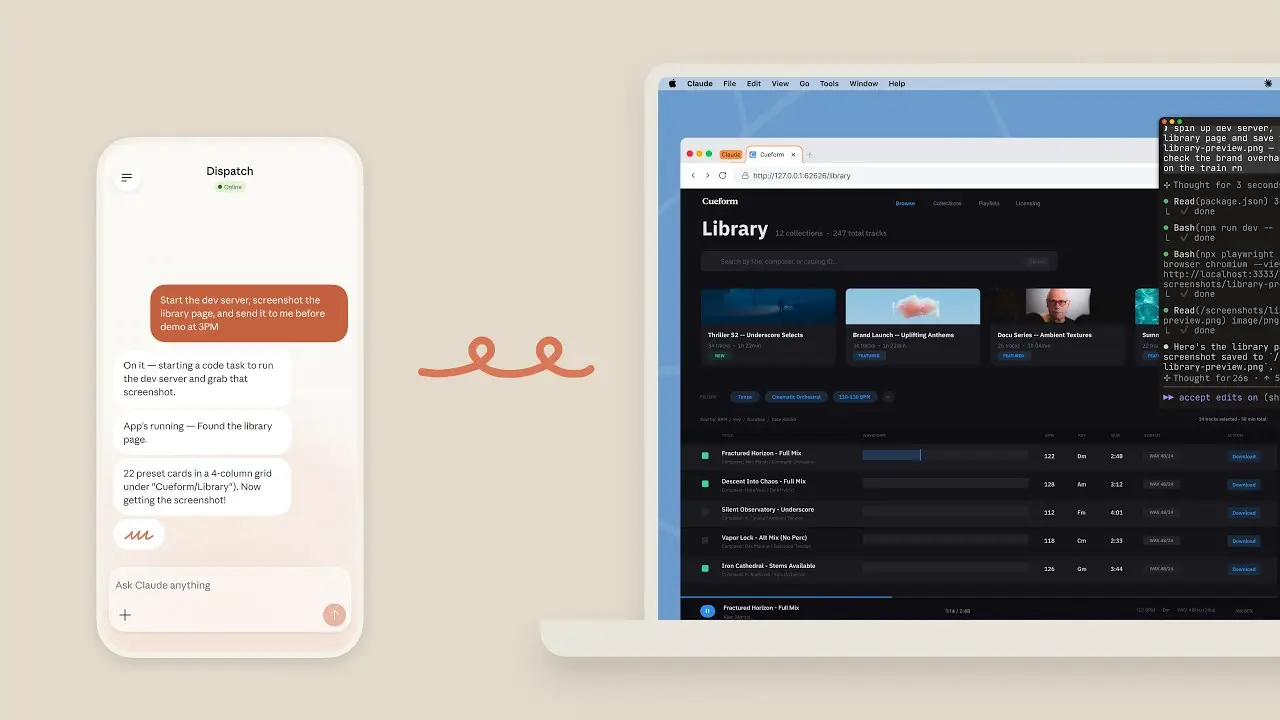
Anthropic just gave Claude AI a serious upgrade. It’s no longer confined to chat; it can now interact directly with your computer and take action.
That changes the experience completely. Instead of walking through every step yourself, you can describe what you need, and Claude AI moves toward getting it done.
What Is the Claude AI Computer Use Feature?
The Claude AI computer use feature, available within Claude Cowork and Claude Code via the desktop app, allows the AI to control a computer interface much like a human would. It can:
- Move the cursor.
- Click buttons.
- Type text.
- Open applications.
- Navigate web browsers.
It does this by analyzing what is visible on your screen and responding in an interactive, stepwise loop. In simple terms, Claude works like an AI assistant that can use your computer to get things done, not just talk.
How Claude AI Controls Your Computer
Claude follows a clear, step-by-step process to get tasks done:
- It captures screenshots of your screen.
- It interprets the interface layout.
- It decides the next action.
- It performs mouse and keyboard inputs.
- It repeats this loop until the task is complete.
Importantly, Claude uses the most precise tool available first. When you assign a task, it follows a priority order:
- Connectors (such as Gmail, Google Drive, Slack, or Calendar).
- Browser-based actions.
- Direct screen interaction (clicking, typing, navigating desktop apps).
Screen-based control is the last option, not the default.
Real Tasks Claude AI Can Perform
Claude’s capabilities are practical and already demonstrated. In examples shared by Anthropic and reported by major tech publications, a user can ask Claude to export a pitch deck as a PDF and attach it to a meeting invite, and Claude handles the workflow.
In practice, it can:
- Open and edit files on your system.
- Navigate websites and extract key details.
- Handle filling out forms online.
- Use development tools to complete your workflows.
- Get things done across several apps.
This is a shift in AI automation, where the AI actually does the work for you instead of just talking about it.
Platform Availability and Access (March 2026)
Here is what is currently confirmed:
- Available on macOS via the Claude Desktop app.
- Powered by Claude Cowork (productivity) and Claude Code (developers).
- Screen control requires Pro or Max subscription.
- Enterprise plans expected to include added safety controls (details coming soon).
- Announced on March 23, 2026.
Permissions and User Control
Access to your computer isn’t enabled by default. You must turn it on in the Claude Desktop app settings.
Once active, Claude:
- Asks for approval before interacting with any app.
- Works only in approved environments.
- Runs tasks in an isolated virtual machine (VM) for security.
- Can be stopped at any time.
- Some actions may be blocked to protect your system.
This keeps automation under your control and fully visible. Files never leave your device for training.
Limitations You Should Understand
The feature is still evolving. Anthropic notes that it is earlier-stage compared to more mature capabilities. As a result:
- Complex tasks may require retries.
- Screen-based control is slower than direct integrations.
- Accuracy depends on interface clarity and layout.
- Some interactions may be inconsistent.
This research preview phase helps improve the system through real-world feedback.
Why Claude AI Computer Control Matters
- Most computer work is just the same actions on repeat. Opening apps, copying data, switching tabs, filling out forms.
- Claude makes things easier by focusing on results instead of individual steps.
- Skip the manual steps. Tell Claude what you need and it handles the rest from start to finish.
Final Words
AI tools are moving into a new phase. Systems like Claude are no longer just conversational. They are becoming operational. The technology is still early and may not always work perfectly, but the direction is clear.
AI is becoming an active part of how real work gets done. If your work happens on a computer, now is a good time to start paying attention. Give Claude Cowork a try and see what it can do for you.